Motivation
Saving disk space#
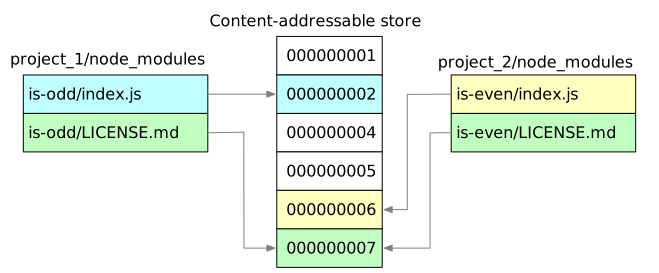
When using npm, if you have 100 projects using a dependency, you will have 100 copies of that dependency saved on disk. With pnpm, the dependency will be stored in a content-addressable store, so:
- If you depend on different versions of the dependency, only the files that
differ are added to the store. For instance, if it has 100 files, and a new
version has a change in only one of those files,
pnpm updatewill only add 1 new file to the store, instead of cloning the entire dependency just for the singular change. - All the files are saved in a single place on the disk. When packages are
installed, their files are hard-linked or cloned (copy-on-write) from that single
place, consuming no additional disk space. By default, pnpm copies files only
when the filesystem supports neither. See
packageImportMethod. This allows you to share dependencies of the same version across projects.
As a result, you save a lot of space on your disk proportional to the number of projects and dependencies, and you have a lot faster installations.
Boosting installation speed#
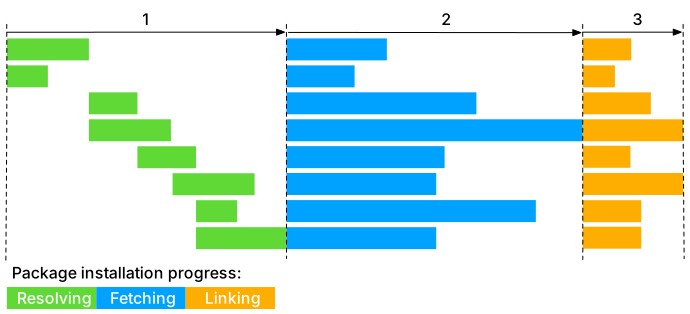
pnpm performs installation in three stages:
- Dependency resolution. All required dependencies are identified and fetched to the store.
- Directory structure calculation. The
node_modulesdirectory structure is calculated based on the dependencies. - Linking dependencies. All remaining dependencies are fetched and hard linked from the store to
node_modules.
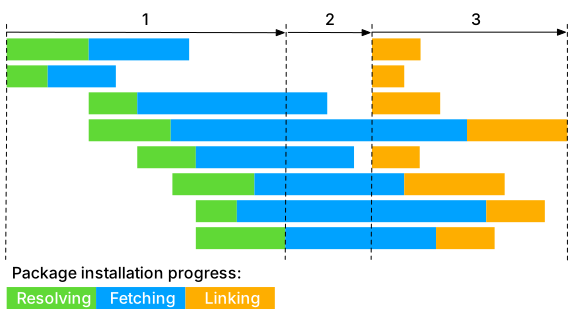
Each package moves to the next stage as soon as it is ready, without waiting for the other packages. This is faster than the traditional three-stage installation process, which resolves all dependencies, then fetches all of them, then writes all of them to node_modules.
Creating a non-flat node_modules directory#
When installing dependencies with npm or Yarn Classic, all packages are hoisted to the root of the modules directory. As a result, source code has access to dependencies that are not added as dependencies to the project.
By default, pnpm uses symlinks to add only the direct dependencies of the project into the root of the modules directory.
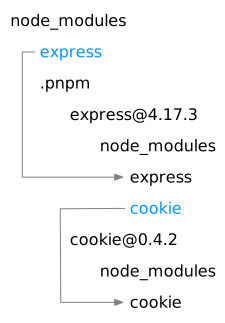
If you'd like more details about the unique node_modules structure that pnpm
creates and why it works fine with the Node.js ecosystem, read:
Tip
If your tooling doesn't work well with symlinks, you may still use pnpm and set the nodeLinker setting to hoisted. This will instruct pnpm to create a node_modules directory that is similar to those created by npm and Yarn Classic.